
Ever wanted to make your Facebook messages stand out — with colored text or creative styling? In the early days, clever tricks let people send rainbow texts, whimsical designs, or flashy chat messages. But as Messenger evolved, many of those hacks stopped working. In this guide, we’ll explore whether you can still send colorful messages today, show working alternatives, and walk you through step-by-step approaches — with screenshots and caveats.
Facebook – a way of popular internet communication, is considered the main part of net lovers’ life, everyone wants something new in Facebook chat. I will introduce an interesting trick of how to send a colorful message in Facebook chat in today’s post.
It was the time when Facebook users saw black text in their chat, but now the time has come when you will find some special codes. By using them, you can make your chat beautiful.
This trick is solely based on the fact that when profile IDs are inserted in between square brackets, it automatically transforms into the profile picture. These IDs are specially created for this purpose.
You can also send messages in colorful text, but these codes will not work in a Status update. This will also not work if the other person is using chat from their mobile.

Also read: Facebook Keyboard Shortcuts
How to send a colorful message in Facebook Chat:
To send a message enriched with colorful images, emojis, and others, we need to insert some special characters while communication with someone.
Let’s see the major chat codes for better communications.
List of Facebook chat Codes:
Here is the list of Facebook chat codes with their alphabets.
[[107015582669715]] = A

[[116067591741123]] = B

[[115602405121532]] = C

[[112542438763744]] = D

[[115430438474268]] = E

[[109225112442557]] = F

[[111532845537326]] = G

[[111356865552629]] = H

[[109294689102123]] = I

[[126362660720793]] = J

[[116651741681944]] = K

[[115807951764667]] = L

[[106596672714242]] = M

[[108634132504932]] = N

[[116564658357124]] = O

[[111669128857397]] = P

[[107061805996548]] = Q

[[106699962703083]] = R

[[115927268419031]] = S

[[112669162092780]] = T

[[108983579135532]] = U

[[107023745999320]] = V

[[106678406038354]] = W

[[116740548336581]] = X

[[112416755444217]] = Y

[[165724910215]]    = Z
How To Use Codes in Facebook Chat:
To create a word of colorful text, copy the codes of the alphabet and make sure to insert a single space between each alphabetical code. Here is the code for the word Facebook. Use the following codes:
[[109225112442557]] [[107015582669715]] [[115602405121532]] [[115430438474268]] [[116067591741123]] [[116564658357124]] [[116564658357124]] [[116651741681944]]
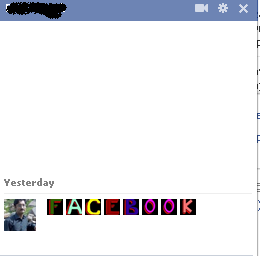
Conclusion:
In short, true colored text in Facebook chat is largely phased out in newer Messenger versions, but you can still add flair using stickers, styled apps, or creative workaround methods. Try the options above, see what works on your device, and let us know in the comments whether your Messenger supports any color tricks. If this guide helped, subscribe to updated social media messaging hacks.