

Have you ever checked your Facebook profile and realized that anyone — even strangers — can see your full friends list? That moment of surprise isn’t just a minor annoyance — it can open the door to unwanted friend requests, spam messages, or just a creeping sense of lost privacy. Fortunately, Facebook gives you the option to make your friends list visible only to you. In this updated guide, we’ll walk you through how to hide your friends list — quickly, clearly, and with steps that work on both desktop and mobile in the Facebook interface.
Maybe many of us have knowledge of this Facebook Privacy feature; if not, then this tutorial will guide you to hide your friends’ list on Facebook from others, even from everyone, and only you can see it.
Since it is the Prime objective of every Facebook user to protect their Facebook Account and their info from an unknown person, and now this is possible because with the new Facebook improved security features, one can have full control of all activities (Status, Posting, Images, and others) while using the Facebook account.
Also, with new Facebook Security features, it is easy to protect the Facebook account from unknown persons by using 2-step Authentication, or if unfortunately, his account was hacked, then there are recovery tips to access your hacked Facebook account.
So, before proceeding with how to Hide Friends List On Facebook, first see why we use this feature..?
Why should we hide the Friends List on Facebook from the Public?
If your privacy settings of Facebook Friends List are set to Public, then everyone can see all your friends and may start adding them or sending friend requests blindly, which may be annoying.
When they see friends in common than they usually accept Friendship. It is a kind of embarrassing situation when your Female Friend or some Family member informs you that one of your friends has sent them a Friend Request. So it is better to let your Facebook friends List be visible only to you and hidden from others.
How to Hide Friends List on Facebook from the Public:
Follow the steps to hide your Friends List on Facebook from others:
- Log in to your Facebook Account and visit your Profile Page (Timeline).
- Click on Friends
- Click on Edit Privacy (Located on the Right Side) and choose the settings from the drop-down menu to Only Me.
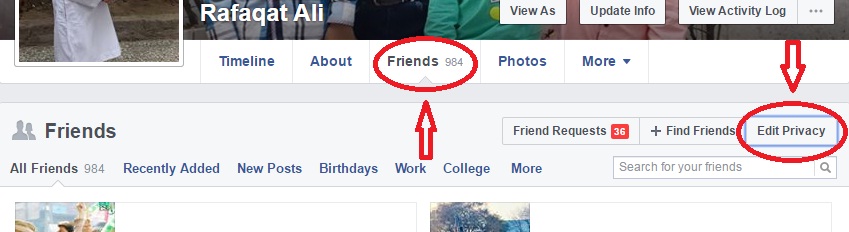
In this way, you can have full control of your Facebook Friends List, and you can also change the other settings to Only Me.
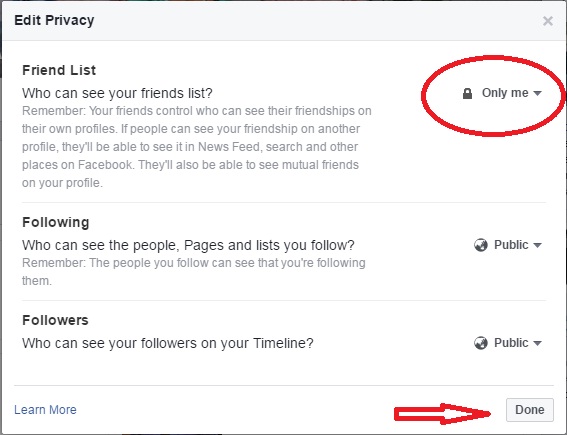
Remember that Facebook did not ask you to keep your Friends List Private and only visible to you; it is your own choice to hide your Facebook Friends List from others or strangers.
Don’t Miss: Use Facebook Activity Log to search all Post History of your Facebook Account
Also: How to handle unnecessary Facebook Friend Requests
& Learn to comment anonymously in Facebook Groups.
Conclusion:
By following these simple steps, you’ve taken control of your Facebook friends list and made it visible only to you. That means fewer unsolicited requests, greater privacy, and more confidence when using your account. If you’ve made the change, take a moment to check your profile as someone else would see it — you’ll see how effective the change is. Have your friends noticed the difference? Share your experience in the comments below. And if you found this guide helpful, don’t forget to subscribe to more up-to-date Facebook privacy tutorials.